A few years back, I got paid on a Friday and by the following Wednesday I genuinely could not tell you where half of it went. Nothing crazy happened. No big purchase, no emergency. It just… left. A coffee here, a delivery order there, a subscription I forgot I had. By the next payday I was back to living off my last fifty bucks and wondering how someone with a full-time job could feel this broke.
If that sounds familiar — if your money seems to evaporate before you even get a chance to plan for it — this one’s for you.
The problem wasn’t that I didn’t earn enough. The problem was that I never told my money where to go. It just wandered off on its own, and I followed it around afterward trying to figure out what happened. That’s what a zero-based budget fixes, and it’s honestly the single thing that changed my relationship with money more than anything else I tried.
Why This Actually Matters
Here’s the honest truth: most people don’t have a spending problem. They have a planning problem. Money comes in, and without a plan, it just fills whatever gap is closest — a sale email, a “treat yourself” moment, a bill you forgot was due. None of it feels irresponsible in the moment. It just adds up to nothing left by the time you need it most.
And the stakes are bigger than just feeling broke for a few days before payday. Without a plan, you can’t build savings, you can’t tell if you’re actually making progress, and you end up making the same money decisions on repeat, every single month, wondering why nothing changes.
A zero-based budget forces every dollar to have a job before you spend it. Not restrictive, just intentional.
What Zero-Based Budgeting Actually Means
Let’s clear up the confusing part first, because the name makes it sound scarier than it is. “Zero-based” does not mean you spend down to zero and have nothing left. It means your income minus your expenses should equal zero — because every dollar has been assigned somewhere.
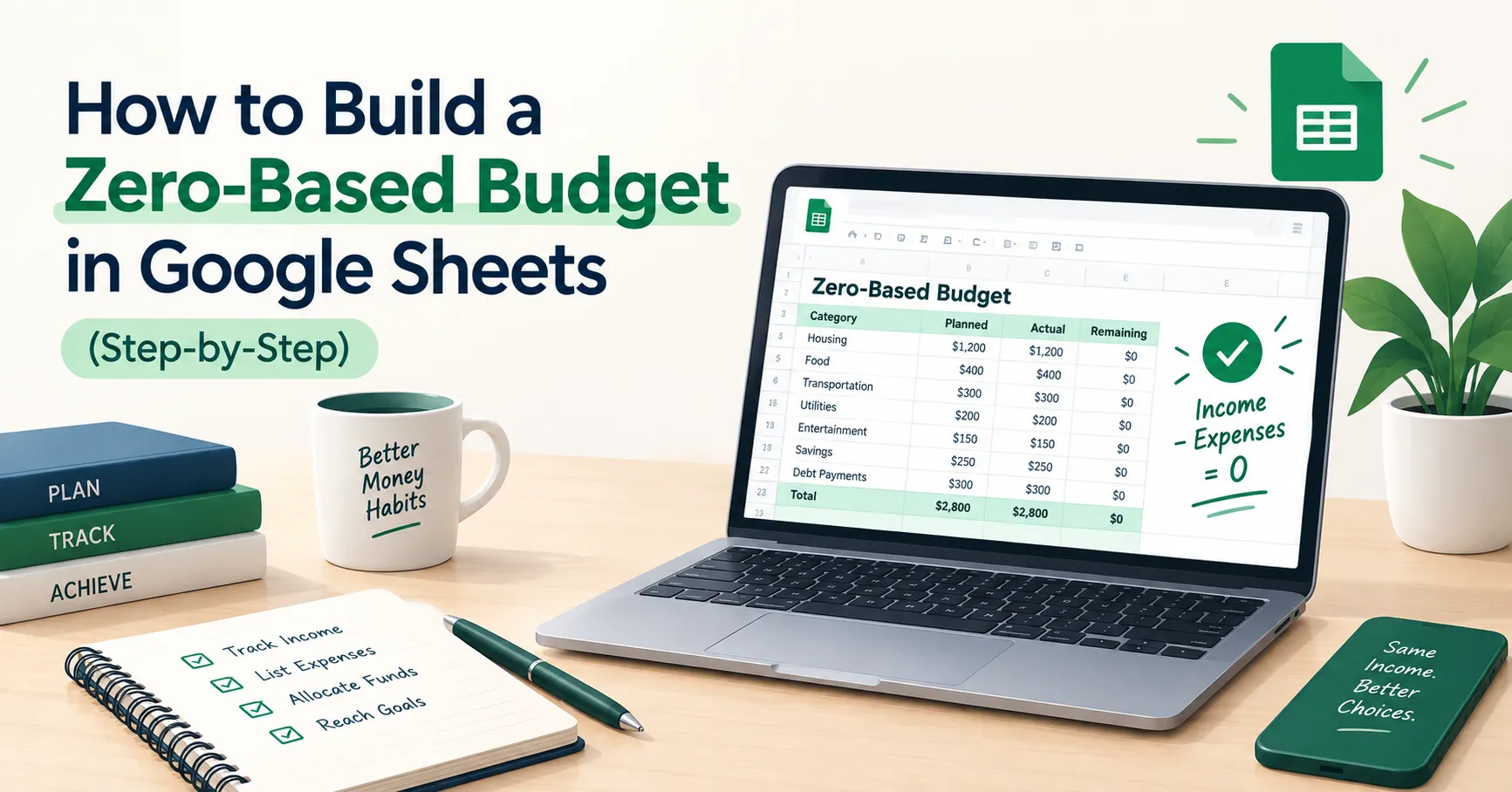
Income − Expenses (including savings) = 0
That’s it. If you’ve got extra left over, that extra gets a job too — maybe your emergency fund, maybe guilt-free spending money. But it’s decided in advance, not discovered by accident on the 28th of the month.
This is exactly what the Zero-Based Budget Template is built to do. It’s laid out in three parts — Income, Expenses, and a Summary — and it does the math for you in real time so you can see, at a glance, whether your plan actually balances.
How to Build Your Zero-Based Budget, Step by Step
- Make your own copy of the sheet. Open the template and go to File, then “Make a copy.” Don’t work directly in the master file — you want a private version that’s just yours to mess with.
- Fill in your Income section first. The sheet already has rows for Salary, Freelance Income, Business Income, and Other Income, each with a Planned Amount and an Actual Amount column. Enter what you expect to bring in under “Planned,” and leave “Actual” blank until the money actually shows up. The sheet totals it for you automatically in the TOTAL INCOME row.
- Work through the Expenses section, category by category. This is where the sheet does a lot of the thinking for you — expenses are already grouped into Housing, Food, Transport, Utilities, Business Expenses, Savings, and Miscellaneous, with a few common line items sitting under each one (things like Rent/Mortgage, Groceries, Fuel, Electricity, Emergency Fund, Entertainment). Go category by category and fill in a Planned Amount for each line that applies to you. Each group has its own Subtotal row, so you’re never staring at one giant unsorted list.
- Don’t skip the Savings category. It sits right there alongside Housing and Food, with its own rows for Emergency Fund, Retirement/Investments, and Other Savings Goal. Give it real numbers, the same way you would a bill. If savings only gets whatever’s left over, it usually ends up being nothing.
- Check the Remaining Balance row in the Summary section. This is the whole point of the exercise. It’s simply Total Income minus Total Expenses. In the Planned column, you want this to land on exactly $0 — that’s what “zero-based” actually means. If it’s showing a positive number, that money still needs a job somewhere above. If it’s negative, something needs to shrink before the month starts, not after.
- Fill in the Actual column as the month goes on. Every row that has a Planned Amount also has an Actual Amount right next to it, plus a Difference column that calculates the gap for you automatically. As bills come in and you actually spend money, log the real numbers. Green usually means you came in under plan, red means you went over — and that visual gap is where the real learning happens.
- Look at the Difference column at month-end, not just the totals. The Summary section will show you your overall Remaining Balance for what actually happened, but the real insight is usually hiding in one or two specific categories — like Food or Miscellaneous running consistently over — rather than in the grand total.
Things I Wish Someone Had Told Me Sooner
Use the Difference column as feedback, not a report card. When a row turns red because you spent more than planned, that’s not a failure, that’s data. If your Dining Out or Entertainment line runs over every single month, the honest fix isn’t more willpower next month — it’s raising the Planned Amount to match reality and finding the money somewhere else. The sheet is showing you the truth about your habits so you can plan around them, not so you can feel bad about them.
Don’t let Savings become the leftover category. It’s easy to fill in every other group first and see what’s left for Emergency Fund or Retirement/Investments. Do it the other way around. Fill in your Savings rows right after Housing, before you touch Food or Miscellaneous, so it’s treated like the non-negotiable it actually is.
Build your budget a few days before the month starts, not on day one. Sit down on the 27th or 28th of the previous month, work through the Income and Expenses sections while last month’s Actual numbers are still fresh, and get ahead of the month instead of reacting to it halfway through.
Watch the small subtotals, not just the big total. A Remaining Balance of $0 in the Planned column can hide a lot. You might be perfectly balanced overall while your Food subtotal is quietly $150 over what it was last month. Scan the category subtotals every time you update the sheet, not just the number at the very bottom.
You Can Do This
A zero-based budget isn’t about perfection, and you’re going to miss the mark some months — that’s normal, not failure. What it gives you is something most people never get with their money: a plan you actually made on purpose, instead of one you discovered by accident after the fact.
Download the free Zero-Based Budget Template, plug in this month’s numbers, and see where your money’s actually supposed to go. And if you want more tools like this showing up in your inbox, join the SheetsWell email list — no hype, no noise, just what’s genuinely helped me and a lot of other people take control of their cash.
Clear your debt. Master your cash. One budget at a time.