There’s a specific kind of tired that comes from checking your bank account the day before payday. You know the balance is going to be small. You check anyway. And somehow it’s always a little smaller than you remembered, and you spend a second trying to figure out where it went, even though nothing “happened” — no big purchase, no disaster, just life, spread out over two weeks.
If you’ve ever done that little math in your head — okay, rent hits Friday, paycheck lands Thursday, will it clear in time — this one’s for you.
Most budgeting advice is built around monthly numbers. One big income figure, one big expense list, done. But that’s not how paychecks actually work for a lot of people. Money doesn’t show up once a month in one lump sum — it shows up every two weeks, in chunks, and every bill doesn’t politely wait for the chunk that matches it. That mismatch is where the chaos actually lives, and it’s exactly what this next tool is built to fix.
Why This Actually Matters
Living paycheck to paycheck isn’t really about how much you earn. I’ve known people who made decent money and still felt broke every other Thursday, because the timing was off, not the amount. Rent due on the 1st, but paid biweekly on the 2nd and 16th. A car payment due right between two paychecks. No plan for which paycheck covers what, so everything just gets paid out of whichever account has money in it, first-come-first-served.
That’s stressful on its own. But it also hides something important: you can’t tell if you’re actually behind, or just disorganized. Those feel the same day-to-day, but need completely different fixes. And if you’re paid biweekly, there’s a detail almost nobody explains to you — twice a year, you get three paychecks in a month instead of two. If you don’t know that’s coming, it either feels like a nice surprise you blow through, or it throws off a budget that assumed every month looks the same.
Meet the Paycheck Budget Planner
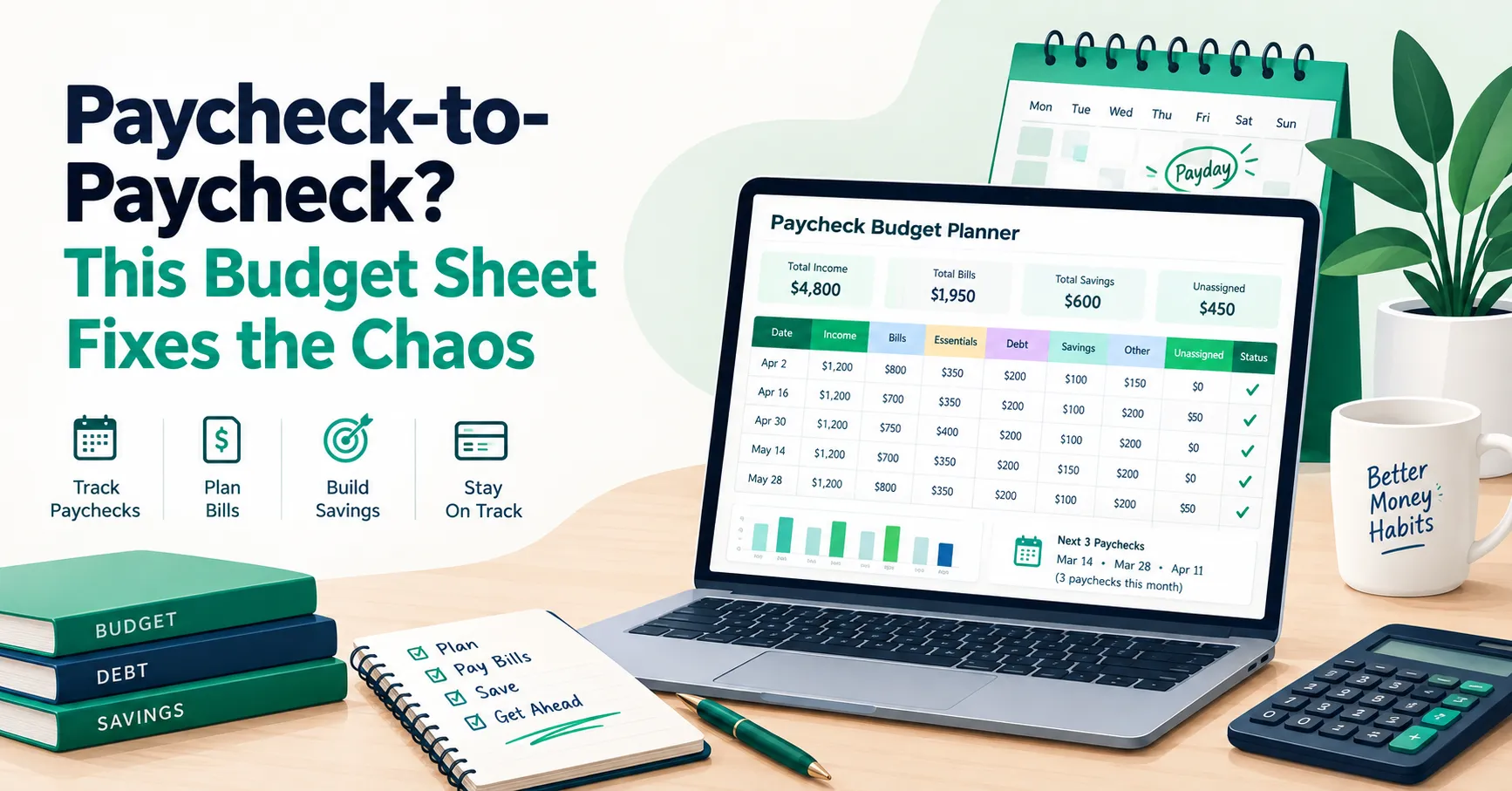
This one’s built around how money actually arrives, not around a calendar month. You set up your pay frequency once — weekly, biweekly, twice monthly, monthly, or irregular — and the planner lays out every single paycheck for the year, on its actual date, and gives you a spot to assign a job to every dollar in it before it even lands.
The part that makes this genuinely useful instead of just another spreadsheet: your bills, debt payments, and savings goals all live on their own tabs, and you assign each one to a specific paycheck. From there, everything flows automatically into that paycheck’s row on the main planner. Nothing gets counted twice, and you can see, paycheck by paycheck, whether you’ve got money left, you’re fully covered, or you’re about to go over.
How to Use the Paycheck Budget Planner
Paycheck Budget Planner- Start on the Setup tab. Enter your Budget Month, Starting Cash Balance, and Pay Frequency, along with your typical and minimum expected paycheck amounts. This one setup step is what lets the rest of the workbook build itself.
- Let the Paycheck Planner fill itself in. Once your pay frequency is set, every paycheck date for the year populates automatically — biweekly adds 14 days each time, weekly adds 7, and so on. If your pay is irregular or twice-monthly, you can just type over any date or amount by hand.
- List every bill on the Bills tab. Enter the amount, due date, category, and frequency for each one, then use the Assigned Paycheck dropdown to pick which paycheck is actually going to pay it. That amount flows straight into the Bills column for the right paycheck on the main planner — so a bill never gets double-counted or forgotten.
- Plan your debt payments on their own tab. Enter each balance, APR, minimum payment, and how much you actually plan to pay — including any extra you want to put toward it. Assign each payment to a specific paycheck, and it totals automatically into that paycheck’s Debt column.
- Set your Savings Goals. Give each goal a name and a target amount, then enter what you plan to contribute per paycheck directly on the main Paycheck Planner tab. Watching “Current Saved” creep toward “Target Amount” on this tab is oddly satisfying once a few paychecks go by.
- Fill in Essentials and Other Spending for each paycheck. Essentials covers groceries, gas, and medical costs — the stuff you need regardless. Other Spending is dining out, entertainment, shopping — the stuff you have more control over. These get entered directly on the planner, paycheck by paycheck.
- Watch the Unassigned column. Every paycheck shows a status: Money Left, Fully Assigned, or Over Budget. You can run this two ways — Zero-Based, where you assign every dollar until Unassigned hits $0, or Flexible, where you leave some breathing room on purpose. Neither is more “correct” — use whichever actually matches how you think about money.
- Check the Dashboard for the full picture. It rolls everything up — total income, bills, essentials, debt, savings, and what’s still unassigned — flags upcoming bills before they sneak up on you, and calls out any months with that extra third paycheck.
A Few Things Worth Knowing
Assign your bills to the paycheck that actually pays them, not the one closest to the due date. This trips people up constantly. Your rent might be due on the 1st, but if your paycheck lands on the 28th, that’s the one that should carry it — not whichever paycheck happens to land closest to the due date on the calendar. Match it to when the money’s actually available.
Don’t skip planning your “extra” paycheck months. If you’re paid biweekly, two months a year hand you three paychecks instead of two. That third one isn’t found money to blow — it’s a chance to make real progress on something, whether that’s extra debt payments, a savings goal, or an annual expense you’d otherwise scramble for. The planner flags these months automatically, so there’s no excuse to be caught off guard by one.
Essential spending drifts more than people think. Groceries and gas don’t feel like they change much week to week, but they quietly do, especially with fuel prices or a bigger grocery week. Check your Actual vs. Planned numbers every few paychecks, not just at month’s end, so a small drift doesn’t turn into a real gap before you notice it.
You Can Get Ahead of This
Paycheck-to-paycheck living feels like a permanent state when you’re in it, but a lot of the stress isn’t really about the amount of money — it’s about not knowing, in advance, what each paycheck is supposed to cover. Once you can see that clearly, the chaos tends to settle down fast.
Download the free Paycheck Budget Planner, plug in your pay schedule, and give your next paycheck a job before it even lands. And if you’d like more tools like this showing up in your inbox, join the SheetsWell email list — no hype, no noise, just what’s genuinely helped me and a lot of other people get ahead of their own paychecks.
Clear your debt. Master your cash. One paycheck at a time.